Character Sculpting Without Anatomy


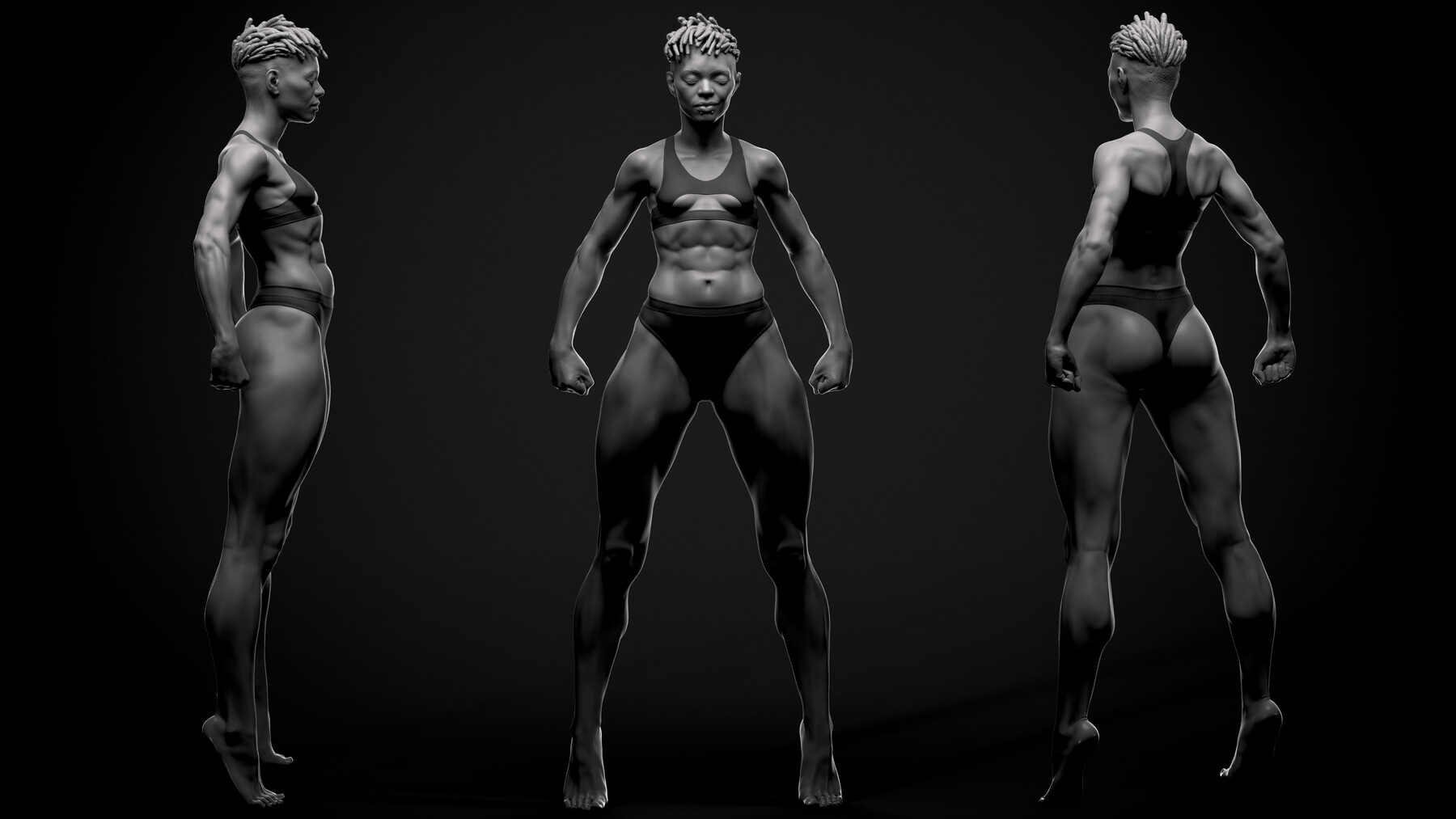


A complete character sculpting demonstration focused on observation, decision-making, and form analysis rather than anatomy memorization.
Aleksandr Kirilenko (Körln) is a professional 3D sculptor and Character/Creature Artist with over 20 years of experience and 15 years working in production — across games, film, collectibles, and digital humans (Netflix, Ninja Theory, Prime 1 Studio, Sony).
This tutorial was built from the methods used in actual production, not adapted from an academic curriculum.Artstation Profile: https://www.artstation.com/aleks_kirilenko
SAMPLE: How I Use a 3D Scan to Get Abdominal Forms Right in ZBrush
WHO THIS IS FOR
This tutorial is for you if:
You know your way around ZBrush but struggle to sculpt forms that read as believable
You spend too long on reference and still can't translate it into the sculpt
You want a faster, more repeatable workflow for character bodies
You're building a portfolio and need results you can finish — not a theory lesson
This is not for complete ZBrush beginners, and it does not cover rigging, texturing, or rendering. Requirements are listed below..
WHAT YOU'LL LEARN
By the end of this tutorial you'll be able to:
Read a 3D scan and extract exactly what matters — volumes, proportions, transitions, surface behavior
Make fast, confident sculpting decisions without second-guessing every form
Build a complete character body from ZSpheres to a polished result in roughly 9 hours
Use LLM prompts to explore silhouette and character direction ideas before ever opening ZBrush
-
Adapt source reference that looks nothing like your final character into your own original design
WHAT'S COVERED
This tutorial covers the complete character body from ZSpheres to a polished stylized result.
The full process takes approximately 9 hours. Both an edited version (commentary throughout, tightened pacing) and the full unedited session recordings are included — so you can follow the clean walkthrough or watch every real-time decision play out.
This tutorial focuses on the body. Head, hands, feet, hair, and clothing are not included.
Everything shown uses the default version of ZBrush. No custom brushes, no scripts, no plugins.
ABOUT THE METHOD
Most sculpting tutorials teach anatomy as memorization. The assumption is that if you know where the serratus anterior attaches, you'll be able to sculpt a convincing torso.
That's not how production works.
Production artists are paid for results, produced quickly. What actually matters is the ability to see forms, understand structure, and translate reference into geometry — efficiently. The workflow in this tutorial is built around that reality.
3D scans are the foundation. A good scan gives you real human volume from every angle, without any interpretation or stylization already baked in. When you work directly from scan data, the question stops being "what should this look like?" and becomes "how do I see what's in front of me and move it into the sculpt?" That's the skill this tutorial trains.
LLM prompts add a second layer. Instead of staring at a blank ZSphere and trying to invent a design, you use structured language prompts to rapidly generate silhouette and character direction ideas, then build a reference board before sculpting begins. Design decisions happen before the clay is touched.
This isn't anti-anatomy. Anatomy is valuable. But it's not the only path to convincing forms — and for many artists working in production, it's not the fastest one.
WHAT'S INCLUDED
Edited tutorial version
Unedited tutorial version
Final character model (no hands, feet, head included)
ZSphere base mesh
PureRef reference board
LLM prompt package for reference generation (included in the PureRef file)
-
Scan list and recommended sources
REQUIREMENTS
ZBrush (any current version — no plugins required)
-
At least one 3D body scan for reference
Recommended: 3dscanstore.com (paid, high quality)
Free alternatives: Scan the World, Sketchfab free scans — a curated list is included with your purchase
Basic ZBrush familiarity — you should be comfortable navigating the interface and using standard brushes. This is not a ZBrush intro course
QUESTIONS?
Does this work for stylized characters? Realistic ones? Both. The method is reference-based, which means it adapts to whatever style you're working toward. The demo character is stylized, but the source scans are realistic — that contrast is intentional.
I don't own any 3D scans. Will this still work? Yes. A curated scan guide is included with free options to get you started immediately (fair warning: not the best quality). But here's what this tutorial will probably change: a professional-quality 3D scan costs less than $10. By the time you've watched the first hour, you'll understand exactly why that's one of the best $10 you can spend as a character artist.
Is the head covered anywhere? Not in this tutorial. The body is the primary focus of the method and the most technically demanding part of character creation.
What if I already know anatomy well? You'll still get value from the observation and decision-making framework — particularly the scan workflow and LLM reference process, which most experienced artists haven't worked with systematically.